Core
01Weight & character
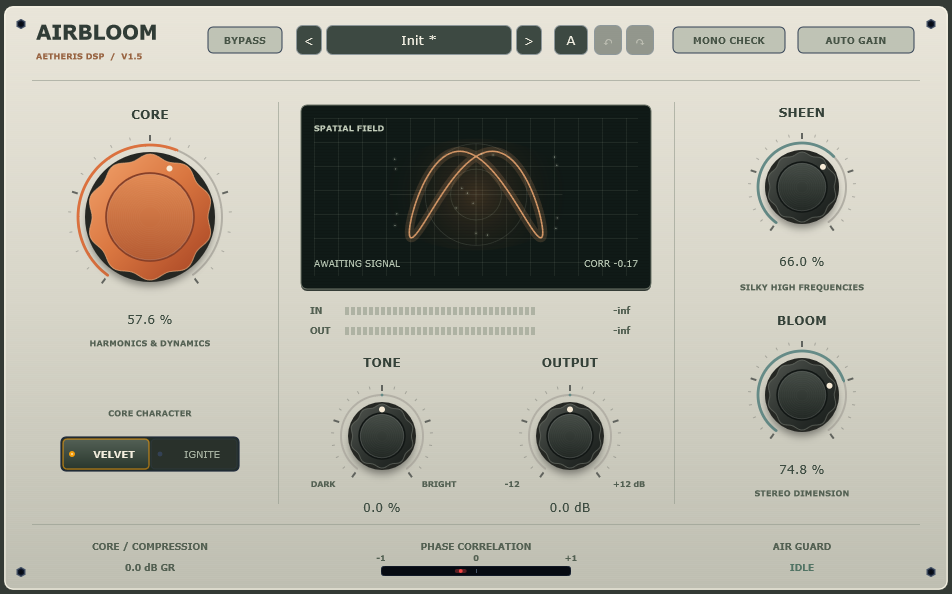
Add body, harmonic density and dynamic character. Stay soft and rounded with Velvet, or find a more assertive edge with Ignite.
 Get Airbloom
CHARACTER. AIR. DIMENSION.
Bring out the weight, the detail, the space.
Airbloom brings harmonic character, silky highs and stereo dimension into one considered tool.
WINDOWS · 64-BIT VST3
01 / THE SOUND
From the first hint of warmth to a more expressive finish. Three essential controls give you a direct route to the sound in your head.
Weight & character
Add body, harmonic density and dynamic character. Stay soft and rounded with Velvet, or find a more assertive edge with Ignite.
Air & articulation
Lift the high frequencies and uncover the finer details. Air Guard helps contain high-frequency harshness as you shape the brightness.
Space & dimension
Open up pads, keys and instrument groups. Find their place in the stereo field, then use Mono Check to hear how the balance translates.
02 / THE PROCESS
Good decisions need a clear point of reference. Airbloom keeps comparison close at hand, so you can focus on what the music needs.
Read the manual PDF · ITALIAN03 / GOOD TO KNOW
The current release is a 64-bit VST3 effect for Windows. Use it in a DAW that supports Windows VST3 plugins. This release is not for macOS.
Close your DAW and copy the complete AIRBLOOM.vst3 bundle to your VST3 folder, usually C:\Program Files\Common Files\VST3. Reopen your DAW and rescan plugins if needed.
On an individual track, an instrument group or the mix bus. Try it on vocals, bass, synths and pads. On a full mix, start with small changes and compare often.
Use Mono Check and listen for the parts that matter. If an element loses too much presence, reduce Bloom and compare with the original. The result depends on your source and the rest of your signal chain.
YOUR NEXT SESSION, A LITTLE MORE OPEN.
Character, air and dimension. All within reach.
Thoughtful tools.
A deeper connection to your sound.